
Layer Delamination in 3D Printing: Causes and Fixes
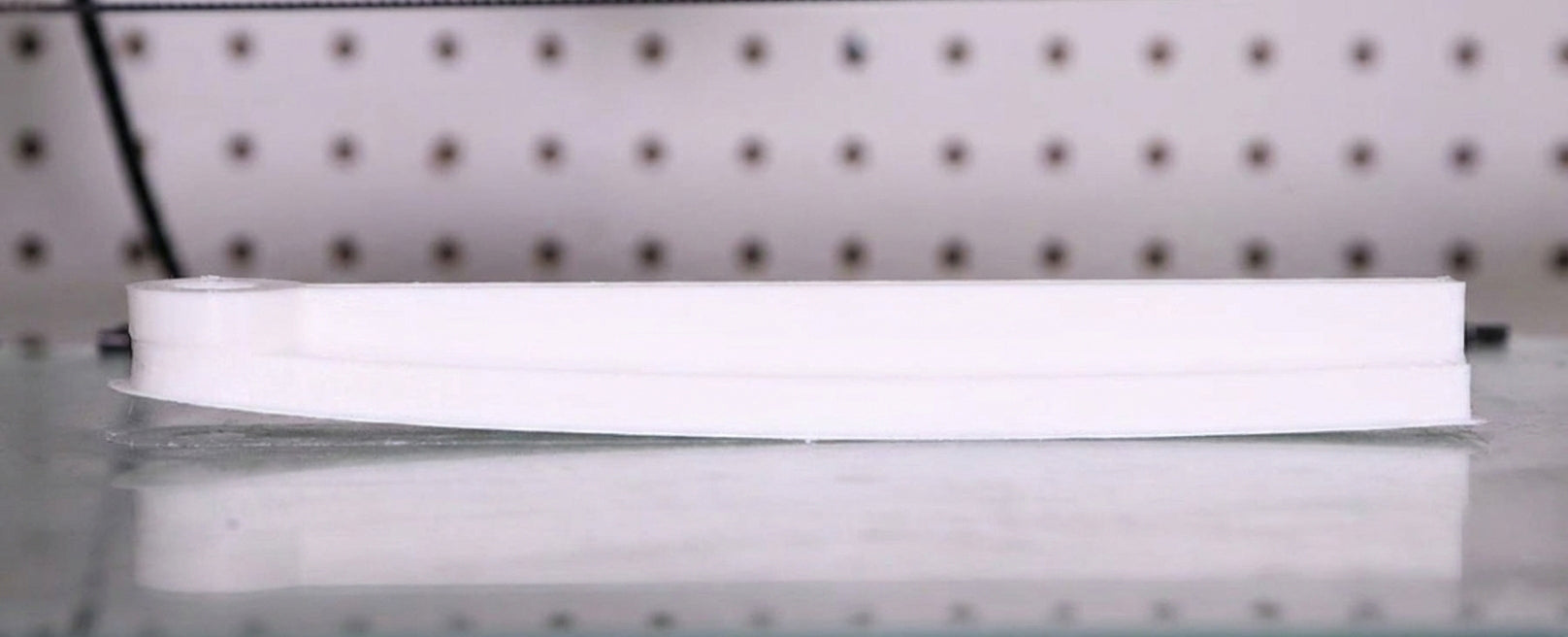
Layer delamination happens when the layers of a 3D print fail to bond properly and begin to split apart. This defect usually shows up as cracks, gaps, or complete separation between layers, making the part weak and easy to break—even under light force

In most cases, delamination is caused by low nozzle temperature, excessive cooling, or printing too fast. The good news is that it’s usually easy to fix with a few setting adjustments.
Quick fixes: increase nozzle temperature, reduce cooling fan speed, slow down print speed, and use an enclosure when possible.
What Is Layer Delamination
Layer delamination refers to poor adhesion between printed layers, where layers separate instead of forming a solid, unified structure. Unlike surface defects, this issue compromises the internal strength of the part.
This problem occurs inside the print rather than at the base, which makes it different from warping.
Delamination vs Warping
These two issues are often confused, but they affect different parts of a print.
-
Warping: Bottom layers lift off the build plate
-
Layer delamination: Layers split apart within the print

Warping can increase internal stress and uneven cooling, which may eventually lead to delamination—but they are not the same problem.
Root Causes
Layer delamination is almost always the result of weak interlayer bonding. This weakness comes from a combination of thermal, mechanical, and environmental factors.
Low Nozzle Temperature

If the nozzle temperature is too low, the filament doesn’t melt enough to properly fuse with the previous layer. Without sufficient heat, molecular diffusion between layers is limited, resulting in weak bonds.
Even small temperature drops can significantly reduce layer adhesion.
Weak Interlayer Bonding
Strong prints rely on each new layer slightly remelting the surface beneath it. If layers cool too quickly or extrusion is inconsistent, bonding becomes mostly mechanical rather than molecular—dramatically reducing strength.
Excessive Cooling

Cooling fans improve surface quality, but too much cooling can cause layers to solidify before they bond properly.
Materials like PETG, ABS, and ASA are especially sensitive to aggressive cooling and are prone to delamination when fan speeds are too high.
Internal Stress

Tall or large prints often cool unevenly along the Z-axis. Temperature differences between upper and lower layers create internal stress that can pull layers apart over time.
Dense infill can also trap heat and increase stress inside the part.
Temperature and Bonding
Temperature is the single most important factor in preventing layer delamination.
Proper extrusion temperature allows polymer chains to diffuse across layer boundaries, creating strong molecular bonds. If layers cool below their glass transition temperature too quickly, adhesion strength drops sharply.
Speed and Cooling Effects
Print Speed
Printing too fast reduces the time each layer stays hot, limiting heat transfer and weakening layer fusion.
Fan Settings
Running the cooling fan at 100%—especially early in the print—can severely weaken layer adhesion.
Part Geometry
Tall prints and solid infill structures are more vulnerable to delamination due to uneven cooling and internal stress buildup.
How to Fix Layer Delamination

Increase Nozzle Temperature
Raising the nozzle temperature by 5–15°C is often enough to dramatically improve layer adhesion.
Slow Down Print Speed
Lower print speeds give layers more time to bond and retain heat.
Reduce Cooling
Lower fan speed or delay cooling for the first several layers to improve interlayer fusion.
Optimize Walls and Infill
Increase wall count for strength and reduce infill density to minimize internal stress.
Use a Larger Nozzle
Larger nozzles extrude wider lines, increasing contact area between layers and improving bonding.
Enclosures and Stability

An enclosure helps maintain a stable ambient temperature, reduces drafts, and slows cooling. This makes it one of the most effective tools for preventing layer delamination—especially when printing engineering materials.
If your print is lifting from the build plate rather than separating between layers, refer to our complete guide on 3D printing warping to diagnose the root cause and prevent further failures.
Fix Warping in 3D Printing
Final Takeaways
To prevent layer delamination:
-
Use the correct nozzle temperature
-
Control print speed
-
Avoid excessive cooling
-
Optimize part geometry
-
Maintain a stable printing environment
When these factors work together, your prints will be stronger, more reliable, and far less likely to split between layers.